

Simplifying the training labs in the cybersecurity user manual to reduce the labor costs
B2B • Enterprise SaaS
Overview
D3 Cybersecurity, being a complex product, requires a lot of human resources to onboard new users. As a designer, my approach involves crafting a centralized user manual integrated with simplified training labs, ensuring ongoing benefits for both users and the business.
I have participated in the below process with cross-functional teams to deliver the design.
As UX Designer
• Research
• Problem Analysis
• Task Flow
• User Testing
• Iterations
As UI Designer
• Design Direction
• UI Components
• High-Fi Mockups
• Documentations
• Prototypes
Collaboration
• 3 Designers
• 1 Product Manager
• 1 Developer
• 3 Cyber Engineers
01
Research
Understand the target users, their needs, and pain points related to the user manual
02
Analysis
Analyze the gathered data to identify insights for a deeper understanding of user preferences and requirements
03
Ideation
Generate creative ideas and solutions for the user manual’s structure, content, and visual elements
04
Design
Annotate each design change and provide the reasons behind each decision
05
Testing
Conduct usability testing with potential users to gather feedback and identify potential issues
01 Research
First conducted internal feedback session with people familiar with our current user manual, including engineers, developers, and QAs, collect pain points and qualitative insights about the user manual.

02 Problem Analysis
After analyzing all the user feedback, it was found that most of users experienced similar issues, which can be grouped into same major problems.
Unclear search results
“The search results lacked clarity, making it challenging to find the specific information needed.”
No visual hierarchy
“The design lacked clear order, I feel confused to find information.”
Overwhelmed by long documents
“Some documents are very long and it’s challenging to navigate and extract key information efficiently.”
Different use cases
“As the analyst, I feel that some documents are not related to my workflow.”
Long sample data
“There is some long sample data taking up a lot of space and causing errors when I try to copy it.”
Data Analysis
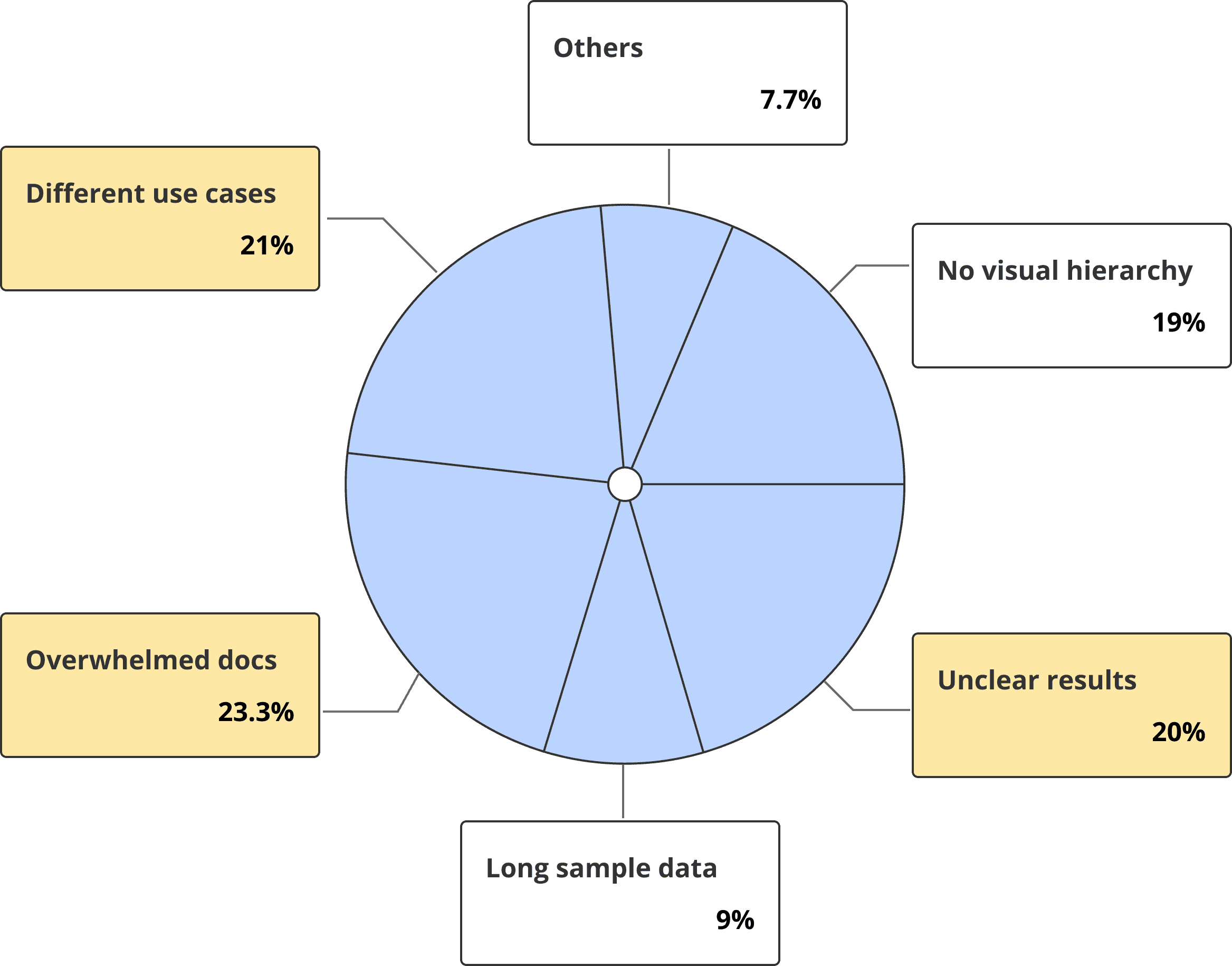

High-Impact Issue
This product is mainly used by analysts and engineers. To help them use it, the company spends a lot of time and resources on training. Clients also invest time and resources to train their analysts and engineers on the product. Learning how to use the product takes a while for analysts and engineers. Including training labs can benefit everyone - D3, clients, analysts, and engineers.
Therefore, the priority is to enhance the training lab first.

Training Lab Research
Collaborated with the cyber engineer and new internal users to find out the pain points of current training labs.
Pain Points
Complicate Flow
Users might get confused moving around the training lab for different users, making it frustrating.
Lack of Overview
Users don’t know how long each lab takes, making it hard to manage their time.
Lack of Content
Users aren’t sure why they’re doing each lab or what they’re supposed to learn, making it confusing to navigate.
03 Ideation
Pain Points
Complicated Flow
Users might get confused moving around the training lab for different users, making it frustrating.
Current Training Flow

The Problem
There is only one training lab but there are different types of users. Engineers and analysts find it hard to use because it doesn't match their specific tasks and needs.

Design Decision
Separated the labs into different flows could help users digest and improve the training experience.
Design Solution
New Task Flow For Analyst
Simplified training lab flow by only focus on the modules for analysts.

New Task Flow For Engineer
Simplified training lab flow by only focus on the modules for engineers.

04 Design
New Training Lab Card
Pain Points
Lack of Overview
Users don't know how long each lab takes, making it hard to manage their time
Estimated Time
Clearly indicates the expected time commitment for completing the lab. Helps users plan their schedules accordingly.
Skill Level
Guiding users to choose labs that match their proficiency.
Requirement
Ensuring users are aware of necessary resources.
Design Solution

Final Training Lab Card


New Training Lab Content
Pain Points
Lack of Content
Users aren't sure why they're doing each lab or what they're supposed to learn, making it confusing to navigate
Design Decision
Adding purpose, key learning objectives, and lab outline could help users quickly assess if a lab align with their demands and guide them to make decisions.

05 Testing and Outcomes
Conduct user testing to assess the impact of the implemented changes on user experience, efficiency, and overall satisfaction.
Improved efficiency
Users found it easier to navigate to each chapter and saved 20% of their time locating the associated resources.
Enhanced user satisfaction
Users found the new training lab flow much clearer and easier to digest without having to read the entire user manual.
Takeaways
What I have learned:
• Prioritize features by measuring their impacts on users and business
• Discussions with developers in the early stages to understand technical constraints and labor resources
• Identification of feasible options through collaboration with developers